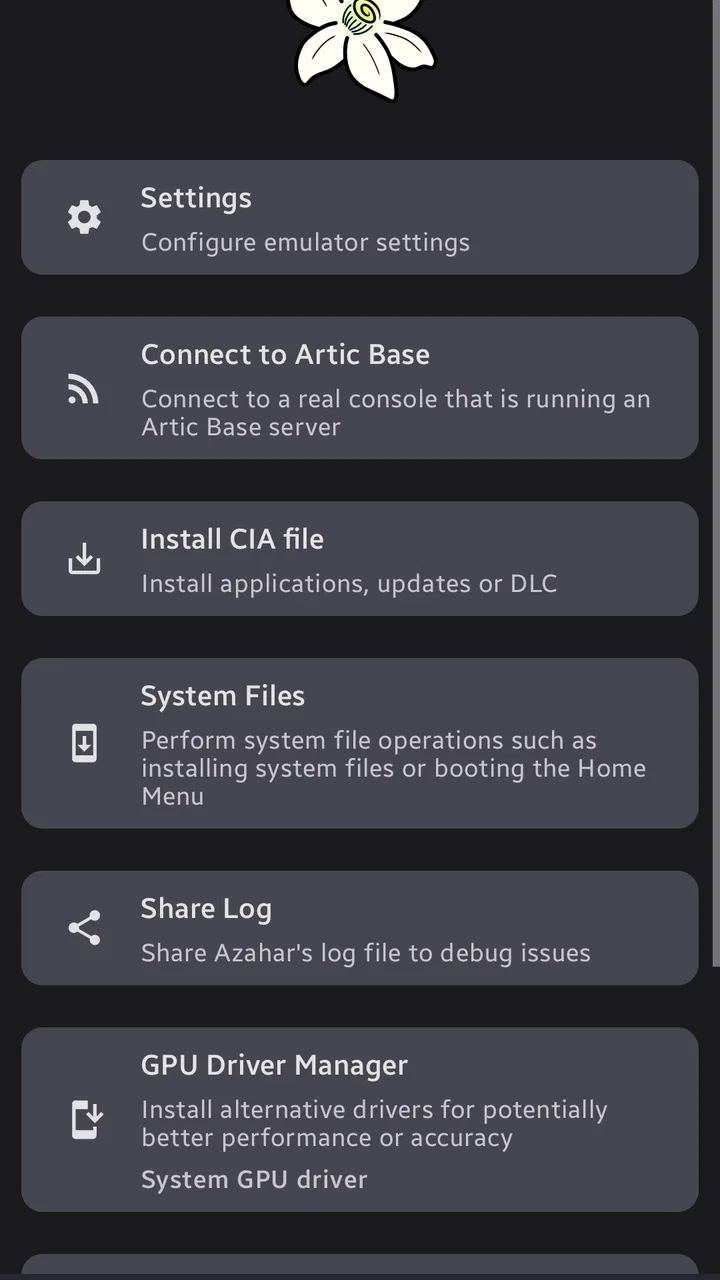
Azahar Emulator
- 3.6
- Rating
- 1.00M
- Installs
- Free
- Price

 Analysis by App-foxy
I approached Azahar Emulator as an arcade game rather than as a typical pick-up-and-play title, and that distinction matters. Its main appeal is the ability to bring Nintendo 3DS software to an Android phone through an open-source emulator based on Citra. In practice, that makes it a tool for accessing games you already own in a more portable way, not a self-contained game with its own levels, characters, or campaign.
That concept is exciting, but it also asks more from the player than a normal arcade download. You need compatible game files, a phone running Android 10 or newer, and enough patience to adjust controls and performance. I found the experience most rewarding when I treated it as a flexible gaming setup rather than expecting the simplicity of an ordinary store game.
The app is free and aimed at Everyone, which makes it approachable on paper. Its presence on more than a million devices shows that many Android users are interested in this kind of 3DS access. At the same time, its average rating of 3.6 from roughly four and a half thousand ratings suggests a mixed experience, and that feels understandable: results depend heavily on the phone, the game being run, and the user's willingness to configure things.
You May Also Like

 Blood Strike: 2.5 Anniversary
Blood Strike’s Loadouts Turn Every Drop Into a Tactical Gamble
A close look at Blood Strike’s custom loadouts: how fast access to signature weapons reshapes its battle royale rhythm, rewards preparation, and narrows the gap between fights.

 Pandora - Music & Podcasts
Pandora’s Music Is Easy to Start, but Harder to Recover
Pandora’s strength is its low-effort path from a seed to a station. Its weak spot is how much confidence it asks you to place in connection, setup, and quiet recovery.

 8 Ball Pool
 Is Built on Rivalries, Rematches, and Routine
A close look at the rivalries, rematches, shared routines, and unanswered safety questions that turn a quick pool match into a persistent mobile community.

 Samsung Music
’s Quiet Strength Is Playing What You Already Own
Its reach comes less from spectacle than from dependable access to a personal library. That simplicity is both the app’s strongest retention engine and its ceiling.

 AccuWeather: Weather Radar
AccuWeather Review: A Quick, Clear Forecast for Everyday Decisions
For everyday plans, the best forecast is the one you can understand quickly. AccuWeather makes rain timing, radar, and local conditions easy to act on, with a few trade-offs.

 Hill Climb Racing
Why Hill Climb Racing Still Turns Crashes Into One More Run
A tiny car, a bumpy hill and one more upgrade: Hill Climb Racing keeps resurfacing because its simple chaos makes every near-miss feel personal.
More From Our News Desk



What the 3DS emulation capability changes
The important capability here is not merely “playing old games on a phone.” It is the attempt to reproduce a handheld platform with two screens, touch input, physical buttons, and software designed around a particular device. That creates possibilities that a standard arcade game cannot offer, but it also introduces compromises that are easy to overlook before installing an emulator.
In my experience, the biggest benefit is convenience. A compatible Android phone can become a single place for a collection that would otherwise require carrying a separate handheld. This is especially useful during travel or short waiting periods, when I want access to a familiar game without changing devices. The phone's touchscreen also gives the lower display a natural place, although the exact comfort depends on the screen size and how the layout is arranged.
Azahar Emulator is developed by Azahar Emulator Developers, and its open-source foundation is relevant to the way I judge it. Open-source does not automatically mean every game will run perfectly, but it does make the project feel more transparent than a mysterious compatibility layer. I see it as an evolving piece of software that benefits from testing and refinement rather than as a guaranteed replacement for original hardware.
One useful way to think about it is as a bridge between preservation and convenience. If I already have legitimate access to my 3DS games, the emulator can make them easier to revisit. If I am looking for an instant arcade experience with no setup, another app will almost certainly be a better fit. The distinction saves a lot of frustration because the first launch is not the end of the process; it is the beginning of configuring a personal setup.
Getting started without treating it like a regular game
The first practical question is where the games come from. Azahar Emulator is the emulator itself, not a catalog of downloadable games. I would only use game files obtained from software I own and have the right to use. That legal and practical boundary is important, because installing the emulator alone does not provide a library to play.
Once a compatible file is available, organization becomes surprisingly important. I recommend keeping game files in a dedicated folder with clear names instead of scattering them across downloads, cloud folders, and messaging apps. This makes it easier to locate them inside the emulator and reduces the chance of confusing several versions of the same title. It also makes future device transfers less chaotic.
A second useful habit is to test one game at a time. When an emulator behaves poorly, adding several variables at once makes diagnosis difficult. I would begin with a single title, confirm that it launches, check whether controls feel comfortable, and only then add more games. This is less exciting than importing an entire collection immediately, but it gives a much clearer idea of whether the phone is suitable.
The current version is 2125.1.1-googleplay, so I would pay attention to version-specific behavior when troubleshooting. If a game suddenly behaves differently after an update, noting the installed version helps separate a configuration problem from a change in the emulator itself. That small detail is easy to ignore, yet it can save time when searching for a solution or comparing experiences with other users.
How it feels during ordinary play
For me, the quality of the experience depends on three things working together: rendering, input, and screen arrangement. A game can technically start and still be unpleasant if the image is difficult to read, the virtual buttons are cramped, or the second screen occupies too much valuable space. I would judge success by whether I can play comfortably for a while, not just whether a title reaches its opening screen.
Touch controls are the most obvious compromise. A physical 3DS has buttons with clear travel and a familiar layout, while a phone overlays controls on a flat display. I found that short arcade sessions are easier to tolerate than long ones, particularly when a game expects quick directional changes. A Bluetooth controller can improve button-heavy games, but it does not automatically solve every two-screen issue; the touch display may still be needed for menus or stylus-focused actions.
Screen orientation deserves deliberate attention. A vertical arrangement can preserve the relationship between the upper and lower screens, while a wider layout may make physical controls more comfortable. Neither choice is universally correct. I would try both with the specific game I want to play, because a layout that looks elegant in a menu may feel awkward once text, action, and touch input compete for room.
Performance is similarly personal. The fact that the minimum operating system is Android 10 or newer tells me whether the app can be installed on a device, but it does not guarantee identical results across phones. Modern hardware, thermal behavior, available memory, and the individual game's demands all influence the result. I would not interpret a smooth experience with one title as proof that the entire library will behave the same way.
That is why I prefer a patient setup routine. I close unnecessary apps, give the phone a moment to settle if it is warm, and avoid changing several graphical options between tests. If the game stutters, I first ask whether the problem is consistent or appears only in demanding scenes. If the controls are the real issue, lowering visual quality will not help. Separating those problems leads to better decisions.
A realistic everyday scenario
Imagine a long train journey with a phone, a compact controller, and a small collection of games you legally dumped from your own 3DS. This is where Azahar Emulator makes the most sense to me. Before leaving, I would test the titles at home, arrange the screens, confirm that the controller is comfortable, and keep the phone charged. During the journey, I could switch between games without packing a second handheld.
The preparation is part of the trade-off. A regular arcade game from an app store usually opens immediately and explains itself through a short tutorial. An emulator rewards planning instead: files need to be organized, controls need to be checked, and some games may require more patience than others. For a trip, that preparation can be worthwhile because the resulting library is more personal and flexible.
I would also avoid making the phone my only copy of anything important. An emulator setup can be convenient, but device changes, storage cleanup, or accidental file deletion can disrupt it. Keeping legal source files backed up in a sensible location is a practical precaution. This is not glamorous advice, but it matters more than another round of visual tweaking if the goal is reliable access over time.
Where the trade-offs become noticeable
The first limitation is compatibility uncertainty. A 3DS emulator cannot promise that every game will behave identically, and Android devices vary too much for a single expectation to fit everyone. Some users will see a comfortable result quickly; others will spend time adjusting a title that remains imperfect. If you dislike troubleshooting, this alone may be a reason to stay with original hardware or a simpler platform.
The second limitation is ergonomics. Phones are designed for general touch use, not necessarily for extended sessions with two emulated screens. A large display can improve visibility but may make the device harder to hold. A smaller phone can be easier to carry but leave less room for touch controls. A controller helps with buttons, yet adds another item to carry and may make the overall setup less spontaneous.
There is also a difference between technical success and emotional authenticity. Playing through a phone can preserve access to a game, but it does not reproduce the exact feel of a 3DS hinge, its physical buttons, or its original proportions. For me, this matters most with games that use the lower screen constantly or depend on precise stylus interaction. In those cases, original hardware may remain the more satisfying option even when the emulator works.
Battery and heat are practical concerns I would consider before using it for a full afternoon. Emulation asks a phone to do more than a lightweight arcade title, and long sessions can change how comfortable the device feels in the hand. I would treat the app as something to test under real conditions rather than assuming that a brief indoor session predicts a whole day of portable use.
Privacy and trust also deserve a sensible approach. The project is open-source, which is a meaningful strength for people who value inspectable software, but I would still install it from a reputable source and keep the app updated through the normal store route. The Google Play release is free, and the absence of an upfront purchase makes experimenting easier, though free access does not remove the time cost of configuring games.
How it compares with the usual alternatives
Compared with playing 3DS software on original hardware, Azahar Emulator wins on consolidation and convenience. One phone can replace another device in a travel bag, and a larger display may be easier to view. Original hardware wins on predictable controls, authentic screen placement, and the assurance that games were designed for exactly that environment.
Compared with other mobile emulators, the meaningful comparison is not simply which app has more switches. I would look at how comfortable the chosen game is, how clearly the two screens can be arranged, and whether the project fits my preference for open-source software. Azahar's Citra-based identity gives it a clear purpose, but the best choice still depends on the titles and phone involved.
Compared with ordinary arcade games from Google Play, this is far less immediate. A conventional arcade download is usually built around touch input, a single screen, and a short path from installation to play. Azahar Emulator offers access to a different kind of library, but asks the user to bring the games, understand the setup, and accept that results can vary. I would choose it for flexibility, not simplicity.
Small decisions that improve the experience
I would start with the game I most want to play, not the game that happens to be easiest to find. That keeps the review of the emulator grounded in a real purpose. If the most important title feels good, the setup is worth developing. If it feels awkward, adding more software will not fix the central problem.
I would also create separate control profiles mentally, even if I do not need formal profiles inside the app. A fast arcade game may benefit from large, widely spaced virtual buttons, while a menu-heavy title may need more screen area for touch interaction. Trying to force one layout on every game is a common source of discomfort.
Another non-obvious tip is to test the setup while holding the phone the way I will actually use it. A configuration that looks balanced on a table can become tiring when held in both hands. I check whether my thumbs cover important screen content, whether the lower display remains readable, and whether the phone's weight makes the chosen orientation practical. This kind of physical test often matters more than a minor visual improvement.
Finally, I would keep expectations modest when evaluating updates. A newer version can improve the overall project, but it does not guarantee that every individual game will gain the same benefit. I would update, retest the titles I care about, and preserve a note of the settings that worked. That simple record turns experimentation into a manageable routine instead of repeated guesswork.
Who will get the most from it
Azahar Emulator is a strong match for Android users who already have a legitimate 3DS library, enjoy adjusting technology, and want a portable alternative to carrying original hardware. It is especially attractive to people who value open-source projects and are comfortable judging performance on a game-by-game basis. The free price makes it easy to try without committing money before knowing whether a particular phone is suitable.
It is less suitable for someone who wants a complete game immediately after installation, expects every title to run perfectly, or dislikes virtual controls. It is also not my first recommendation for a player whose priority is the original handheld feel. In that situation, keeping a 3DS may be the better choice, even if the phone option is more convenient.
The Everyone age rating makes the app broadly approachable, but the practical learning curve is still worth considering for younger or less technical users. Setting up files, choosing layouts, and understanding why one game behaves differently from another may require help. The rating describes general content suitability, not how effortless the emulator is to operate.
My final take after using it
I see Azahar Emulator as a useful specialist tool with a genuinely appealing purpose, not as a universal replacement for a 3DS or a normal arcade game. Its greatest strength is putting a personal 3DS collection within easier reach on Android. Its greatest weakness is that convenience arrives only after setup, testing, and acceptance that your phone may not deliver the same result as someone else's.
The project reached the store on October 11, 2024, and its current release is 2125.1.1-googleplay. Those details make it sensible to approach the app as an actively developing emulator rather than a finished console replacement. I would recommend it to curious players who enjoy the process as much as the result, especially when portability matters more than perfect authenticity.
My recommendation is simple: install it if you have a legitimate 3DS library, a reasonably capable Android device, and the patience to test one game at a time. Skip it if you want instant, predictable arcade sessions with no configuration. For the right user, it can turn a phone into a surprisingly capable window back to 3DS gaming; for everyone else, the setup may outweigh the convenience.
FAQs for Azahar Emulator
01What is Azahar Emulator and what platforms does it support?
Azahar Emulator is a versatile application designed to emulate various gaming consoles on your Android or iOS device. It allows users to play classic and retro games from different platforms directly on their smartphones or tablets. It's a great tool for gamers who want to relive nostalgic experiences or discover older games they missed.
02Is Azahar Emulator legal to use?
Using an emulator like Azahar is legal; however, it’s important to ensure that the games you load onto it are legally obtained. This typically means you should own a physical copy of the game. Distributing or downloading ROMs of games you don't own is often considered illegal and should be avoided.
03How user-friendly is Azahar Emulator for beginners?
Azahar Emulator is designed with a user-friendly interface that caters to both beginners and experienced users. The app provides easy navigation, intuitive controls, and step-by-step guides to help new users get started quickly. It also includes customizable settings for those who wish to fine-tune their gaming experience.
04What are the system requirements for running Azahar Emulator?
To run Azahar Emulator smoothly, your device should meet certain specifications. For Android, it requires at least Android 5.0 and a mid-range processor. For iOS, it’s compatible with devices running iOS 11 or later. Adequate storage space is also recommended to handle game files and emulator data efficiently.
05Does Azahar Emulator support multiplayer gaming?
Yes, Azahar Emulator supports multiplayer gaming, allowing you to connect with friends and other players. Depending on the game and console being emulated, multiplayer can be set up via local networks or online with stable internet connectivity. This feature enhances the gaming experience by bringing a social aspect to classic games.
Pros
- Smooth and intuitive user interface.
- Supports a wide range of ROMs.
- Customizable control settings.
- Regular updates and bug fixes.
- Low resource consumption.
Cons
- Occasional compatibility issues.
- Limited multiplayer options.
- Ads in the free version.
- No cloud save feature.
- Requires manual ROM downloads.

Azahar Emulator
Gallery